How to Fix the “Email Authentication Failed” Issue?
In the digital world, the most critical communication channel an enterprise uses with its customers, business partners, and internal systems is corporate email. Price quotes, e-invoices, password reset links, order confirmations, and critical system notifications are delivered thousands of times every day.
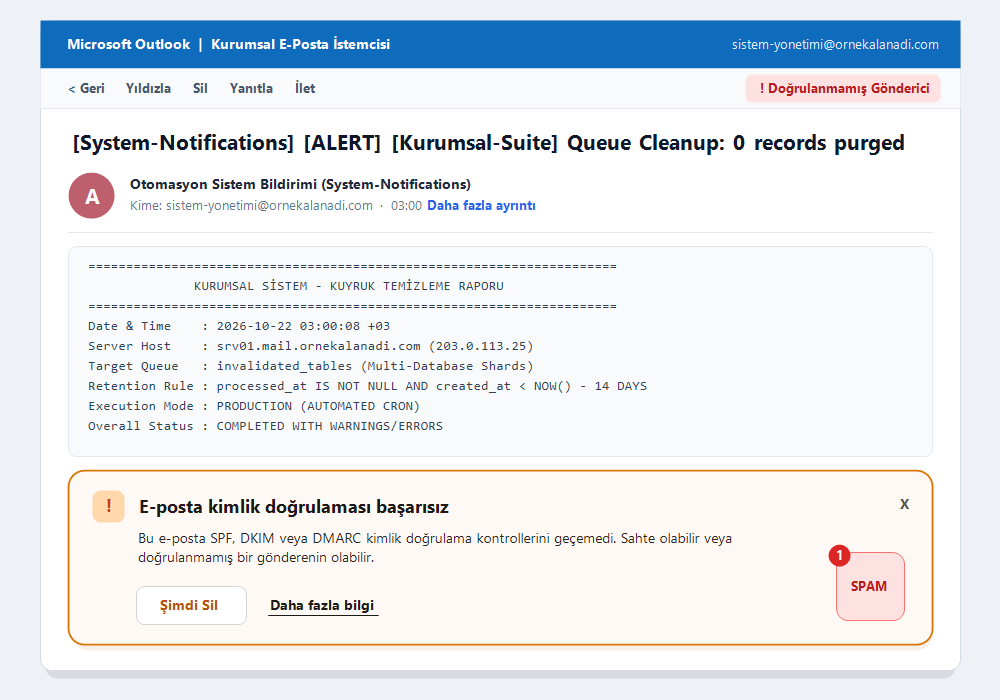
However, many businesses assume that as long as their mail server can send and receive emails after setup, everything is working properly—until a customer or team member sees a red shield icon beneath their message with this alarming warning:
“Email authentication failed: This email failed SPF, DKIM, or DMARC authentication checks. It may be spoofed or from an unverified sender. [Delete Now]”
In this success story, we share how our team at HYZSOFT analyzed this critical issue encountered during our infrastructure work, how we configured SPF, DKIM, and DMARC protocols step by step on Plesk Panel, and how we achieved a 100% authentication pass rate verified by independent testing tools.
How Does This Issue Harm Businesses and Customers?
Failed email authentication is not merely a technical warning; it is a serious business problem that directly threatens sales, customer trust, and information security.
1. Damage to Brand Reputation and Customer Trust
When an official price quote or contract sent to a prospective client displays a “This email may be spoofed” warning, it immediately undermines your company’s corporate image. Assuming the message is a phishing attack, the recipient clicks “Delete Now” without even reading it.
2. Emails Landing in Spam (Junk) or Being Blocked
Global email providers such as Microsoft (Outlook / Hotmail), Google (Gmail), and Yahoo now strictly enforce sender authentication requirements. Messages sent from domains that fail SPF, DKIM, and DMARC checks are either routed straight to the Junk/Spam folder or rejected at the server level before ever reaching the recipient’s mailbox.
3. Disruption of Critical Business and Operational Workflows
- Customer Communication: Order confirmations, shipping tracking details, account activation codes, and password reset links never reach customers, driving up support volume.
- Financial Operations: Invoices, account statements, and payment reminders go unseen by recipients, leading to delayed collections.
- System Notifications: Server and software monitoring/alert notifications get caught in filters, extending response times to critical incidents.
4. Domain Impersonation (Email Spoofing) and Fraud Risk
A domain without properly configured authentication records is an open target for cyberattackers. Malicious actors can spoof your domain (for example, accounting@exampledomain.com) to send fraudulent IBAN change notices or malware-laden attachments to your customers. While your customer suffers financial loss, your brand faces serious legal and commercial reputational damage.
The 3 Pillars of Email Security: What Are SPF, DKIM, and DMARC?
To prove that an email genuinely originated from an authorized server and was not tampered with in transit, three core DNS and cryptographic protocols work together:
- SPF (Sender Policy Framework): A DNS TXT record that publicly declares which IP addresses and mail servers are authorized to send email on behalf of your domain.
- DKIM (DomainKeys Identified Mail): Adds a cryptographic digital signature to the header of every outgoing email from your server. The receiving server (Outlook, Gmail, etc.) verifies this signature using the public key published in your DNS.
- DMARC (Domain-based Message Authentication, Reporting, and Conformance): The overarching security policy that instructs receiving mail servers how to handle spoofed or unauthorized messages that fail SPF and DKIM checks (monitor, quarantine to spam, or reject outright).
Our Step-by-Step Resolution: Configuration via Plesk Panel
To permanently eliminate the “Email authentication failed” warning, we applied the following steps across our Plesk Panel and DNS infrastructure:
Step 1: Enabling DKIM Signing in Plesk Panel
First, we navigated to Mail > Mail Settings for the relevant domain in the Plesk administration panel. There, we enabled the “Use DKIM spam protection system to sign outgoing email messages” option so that the server cryptographically signs all outgoing messages.

Step 2: Configuring SPF, DKIM, and DMARC DNS Records
Once DKIM is enabled, Plesk automatically generates the corresponding default._domainkey public key. However, to ensure that the sending server IP as well as any external relay or notification services are explicitly authorized, we updated our records under DNS Settings in full compliance with email authentication standards:
Type: TXT
Host: exampledomain.com
Value: v=spf1 +a +mx +ip4:203.0.113.25 -all

Type: TXT
Host: default._domainkey.exampledomain.com
Value: v=DKIM1; k=rsa; p=MIIBIjANBgkqhkiG9w0BAQEFAAOCAQ8AMIIBCgKCAQEA...

Type: TXT
Host: _dmarc.exampledomain.com
Value: v=DMARC1; p=quarantine; rua=mailto:dmarc-reports@exampledomain.com; pct=100; adkim=r; aspf=r
Step 3: Verification via an Independent Email Testing Service
After DNS propagation completed, we sent a test email to an independent email authentication and spam-testing platform to evaluate our configuration against international standards.
The analysis confirmed the following results:
- SPF Check: Sending IP address matched the domain’s authorized list (PASS).
- DKIM Check: Digital signature successfully verified against the public key (PASS).
- DMARC Check: Domain alignment and policy validated (PASS).
- Deliverability Score: Achieved a perfect 10 / 10 score, confirming that the message passes all spam and security filters cleanly.

Step 4: Final Verification in Outlook and Mobile Clients
After completing the configuration and testing steps, we triggered the exact same notification flow again. In the new messages delivered to Outlook and mobile email clients, the red security warning had completely disappeared and the sender identity was officially verified.

Tangible Benefits of the Solution: Before and After
Following this implementation, we achieved the following improvements in both technical infrastructure and customer communications:
| Criterion | Before Configuration | After Configuration (HYZSOFT Solution) |
|---|---|---|
| Recipient Display | “Email authentication failed / May be spoofed” warning | Verified sender (Signed by: exampledomain.com) |
| Inbox Placement | Landed in Spam/Junk or rejected outright | Direct Primary Inbox delivery |
| SPF / DKIM / DMARC Status | Fail / None (No authentication) | PASS / PASS / PASS (Full authentication) |
| Domain Security | Vulnerable to email spoofing attacks | Protected by enforced DMARC policy |
| Customer Trust | Perceived as suspicious and at risk of deletion | Corporate, secure, and uninterrupted communication |
Conclusion: Do Not Leave Your Corporate Email Reputation to Chance
At the end of the day, even if you build the finest software or prepare the most competitive commercial proposal, if your email opens on the customer’s screen with a “May be spoofed” warning, all that effort can end up in the trash with a single click.
At HYZSOFT, we apply the highest security standards at every layer—from custom enterprise web applications to server and cloud architecture management. If your corporate emails are landing in spam, failing to reach customers, or triggering authentication warnings, contact the HYZSOFT expert team to audit and secure your infrastructure end to end.